Skip to content
AxleGuard
Demo

Operations

Plan the load where the mistake is still free.

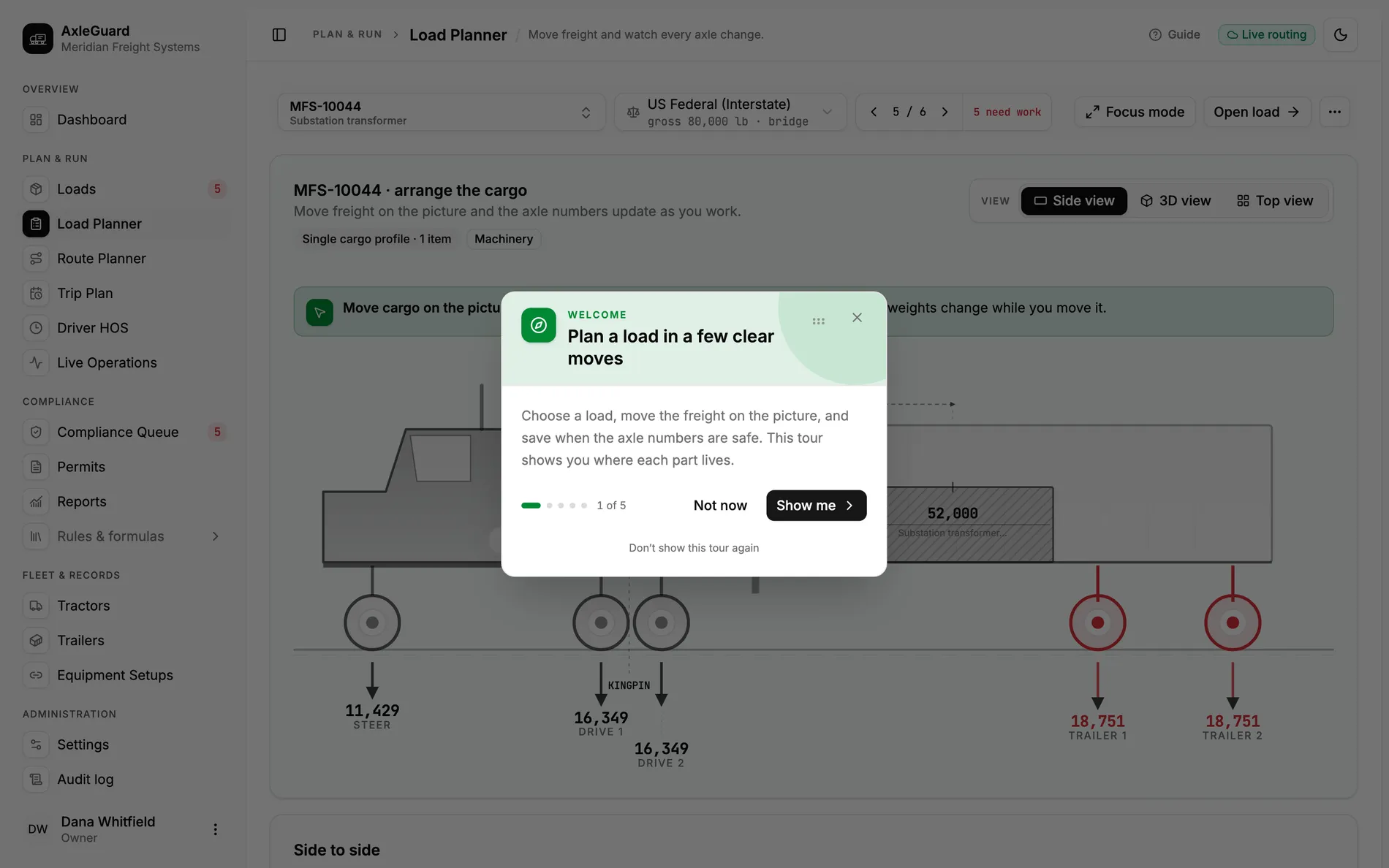
The planner is a side-view and a 3D view of the actual trailer, with the actual freight in it. Drag a pallet and every axle gauge moves in the same frame. There is a focus mode that fills the screen, and the load can be turned, sliced and inspected from any angle before anyone touches a forklift.

Views
Side + 3D
same model, same numbers
Recompute
Live
on every drag, not on save
Placement axes
3
along the deck, across it, and CG height

In the product

The screen where this work happens.

Open AxleGuard
Drag freight along the deck and the axle gauges respond live. Green, amber and red are the same three signals the driver already knows.

What changes

Three outcomes that matter in the operation.

Each outcome connects what the software does to the decision a planner, loader or driver can actually make.

01

You see what a placement costs while you are still choosing it

Freight is put where it will really sit: how far back from the nose, how far off centre, how high its weight sits. Drag it and the axle readings move with it.

Why this is different

The usual planning tool is a spreadsheet of weights with no geometry in it at all. It can tell you the load is 46,000 lb. It cannot tell you that the first 12,000 lb of it is in the wrong place.

Two pallets, 4,000 lb, moved 8 ft back

The load is 1,100 lb over on the drives. Dragging two 2,000 lb pallets from the nose to behind the tandems takes roughly 1,300 lb off the drive axles and puts it on the trailer group, which has room to take it. The planner watches the drives go from red to green in the same second, without opening a calculator.

02

The picture and the verdict come from the same numbers

A 3D view of the trailer with every item drawn to scale. Turn it, fill the screen with it, walk around the load before anyone touches a forklift. It is drawn from the same placements that produce the axle verdict.

Why this is different

Where a loading diagram exists at all, it is usually a separate drawing that no weight check ever reads. The drawing and the weights drift apart over the day, and the drawing is the one the loader believes.

A 46,000 lb load signed off from a diagram

The diagram shows the freight spread evenly down the deck. The weight behind it was entered as one line: 46,000 lb, on the trailer. Nothing joins the two, so nobody notices that as actually drawn the load puts 35,200 lb on the drives. When the picture is the model, the red gauge is on the same screen as the picture.

03

Tomorrow's board can sit in draft until tomorrow

Loads can be laid out, saved half-finished, revised later, and planned several at a time. Every change is recorded with the name of the person who made it.

Why this is different

Tools that hold one load at a time push the real work into email and a whiteboard, and the version people act on is whichever one they happened to see last.

Four loads laid out on Thursday for Friday

Three are complete. The fourth is waiting on a weight from the shipper. On Friday morning the weight arrives, goes into the draft, and the axle verdict comes back the same minute. Nothing was re-entered, and the change is on the record with a name against it.

How it works

From input to answer.

The logic is visible. There is no “AI decided” step between the load and the verdict.

Important boundary

Placement is manual and assisted, not auto-optimised. The engine tells you the fix; it does not yet pack the trailer for you.

  1. 01

    Build the load

    Reference, shipper, consignee, commodity, dates, and the tractor-trailer combination it will run on.

  2. 02

    Add the freight

    Each item with weight, dimensions, position, whether it is stackable, divisible, or hazmat.

  3. 03

    Place and adjust

    Drag along the deck. Gauges, bridge subsets and the verdict follow in the same frame.

  4. 04

    Commit

    Save as draft or dispatch. An illegal load cannot be dispatched — the guard is in the API, not just the button.

Where to test it

Hard cases worth checking.

  • Cargo that overhangs beyond the trailer end.
  • A load that is legal at no slider position at all, and must be re-built.
  • Lateral imbalance and the rollover threshold from CG height.
  • Freight that boards mid-route on a milk run and pushes the truck over on a later leg.